Guides
- 360 virtual tour
- 3d tour
- 360 tour
- 3d virtual tour
- virtual tour
360° Virtual Tour vs 3D Tour: What's the Difference and Which One You Need
A 360° tour links panoramas from fixed spots. A 3D tour is built on a model you can move through. How each is made and loads, and which fits your job.

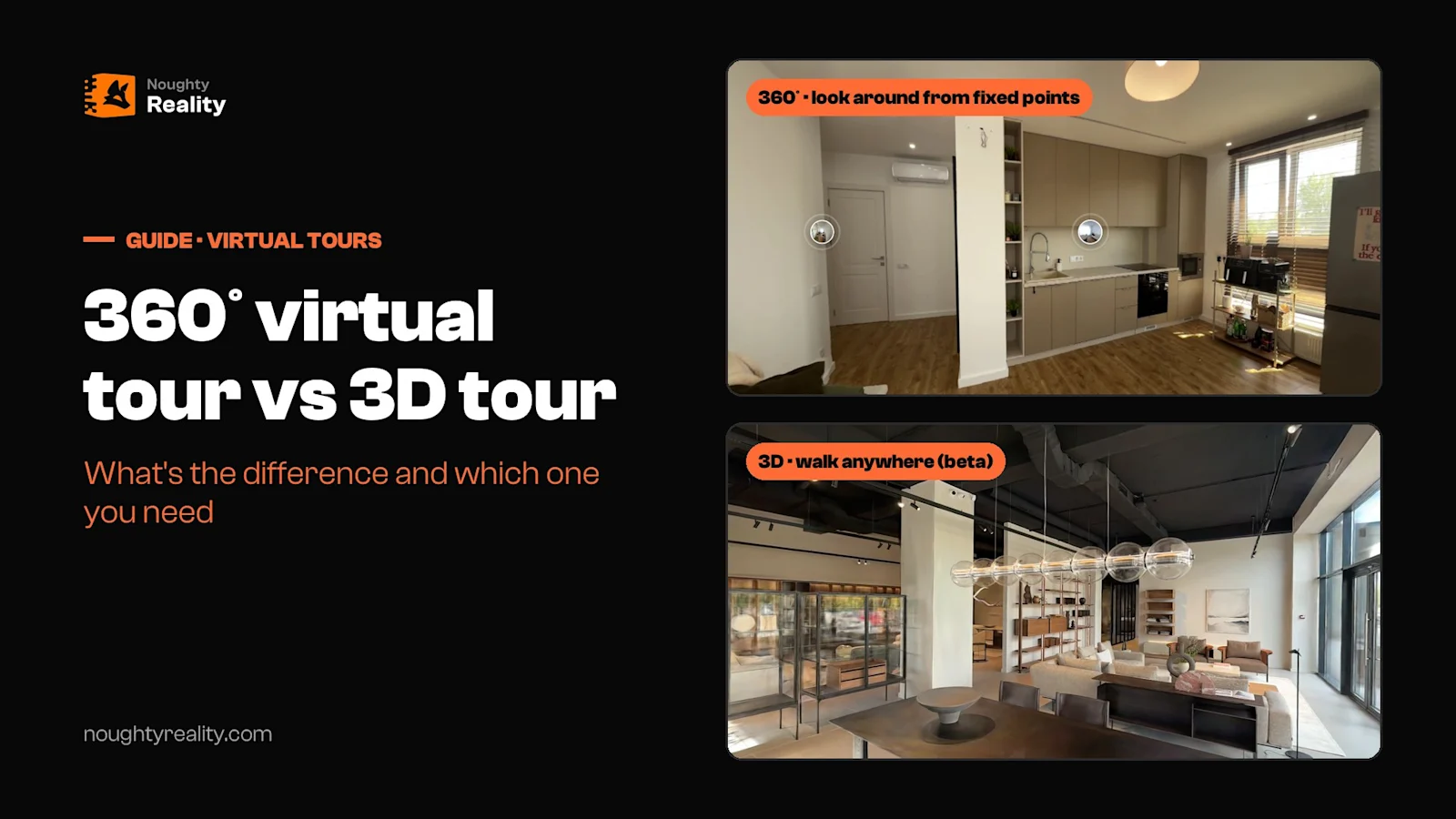
When people compare a 360° virtual tour vs a 3D tour, they usually mean two different data structures, and as the person who decides which one our capture produces, I think that's the useful way to look at it. A 360° tour is a set of panoramas taken from fixed spots. You look around in every direction and click to jump to the next spot. A 3D tour is built on a model of the space, so the viewer can see it from places where nobody stood with a camera, either from above as a "dollhouse" or by moving freely through the rooms. The first is light and opens almost anywhere. The second explains a layout much better and costs more at every stage, from capture to loading.
Neither one measures anything on its own. If somebody needs room areas, they need a floor plan next to whichever tour they pick. I'll come back to that, because it changes which choice matters.
How a 360° virtual tour is built
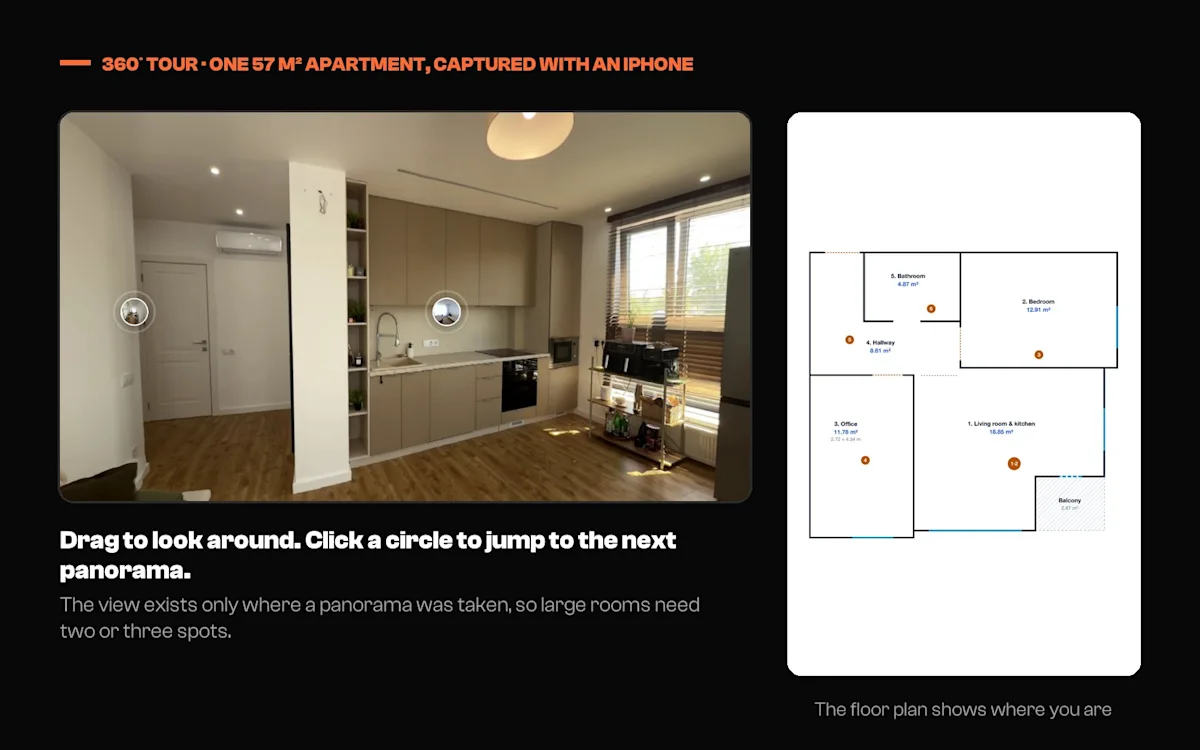
Each frame of a 360° tour is a spherical panorama captured from one spot. A 360° camera gets it in a single shot. A phone gets it by turning on the spot while an app stitches the frames. The panoramas are then linked with hotspots, so clicking a doorway takes you into the next room. In the viewer you drag to look around, up at the ceiling and down at the floor, and click to move. If the tour has a floor plan or a mini map, you also see where you're standing.
What you can't do is stand between two spots. The view exists only where a panorama was taken. That's the main limitation of the format and also the reason it's so cheap to deliver, since the viewer only ever needs one image at a time. It's also why a big or L-shaped room needs two or three spots.
We captured this 57 m² duplex apartment in 360° with its floor plan on an iPhone, so you can try one yourself.
Two things vendors call a 3D tour
The term covers two quite different products, and I'd ask any vendor which one they mean before comparing prices.
The older kind records depth along with the images, and software turns that depth into a model of the whole property. Matterport describes its 3D tours as capturing depth and creating "a virtual 3D model of an entire property that you can zoom into and out of." Inside, you still click from point to point and look around, much like a 360° tour. The extra is the overview. You can zoom out and see the whole home as a model.
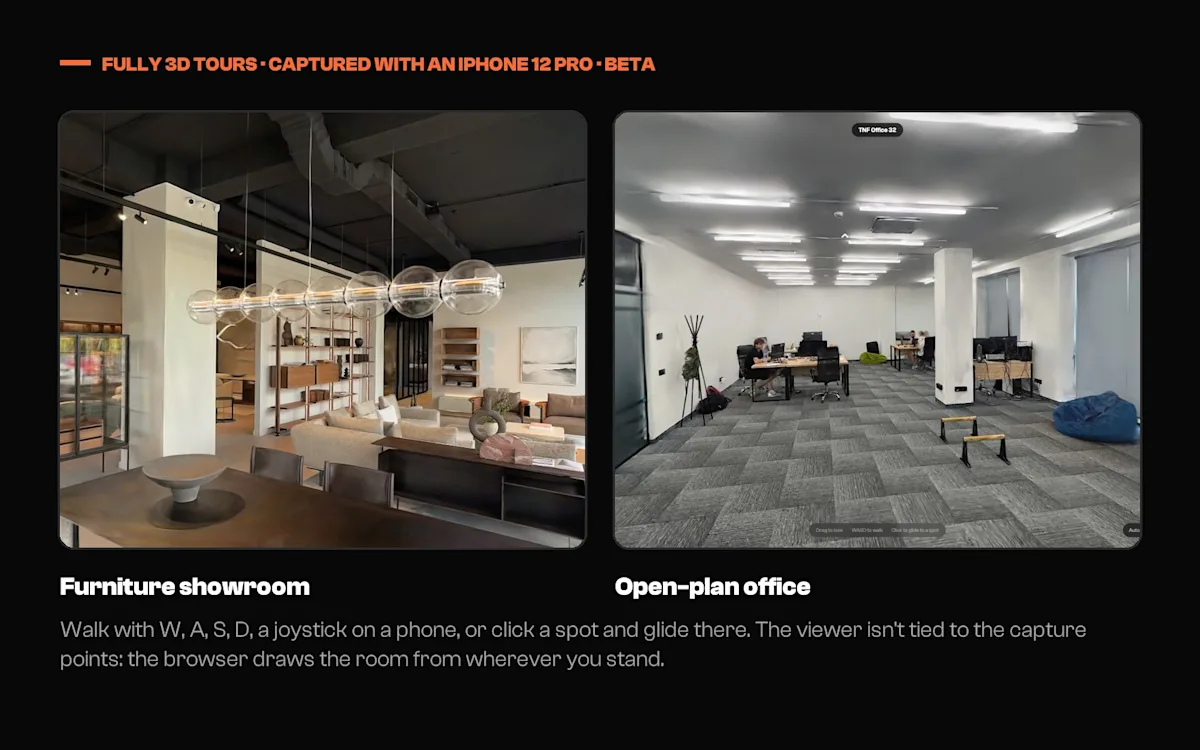
The newer kind drops the capture points entirely. One way to build it is Gaussian splatting, where the space becomes millions of small, soft points and the browser renders them from wherever the viewer happens to be. You walk with W, A, S and D on a keyboard, use an on-screen joystick on a phone, or click a spot and glide to it. We have two of these in beta, both captured with an iPhone 12 Pro, a furniture showroom and our own office. I'll be honest that "beta" is doing real work in that sentence. Viewers, formats and quality still vary a lot from tool to tool, ours included.
The trade-offs of a 360° tour vs a 3D tour
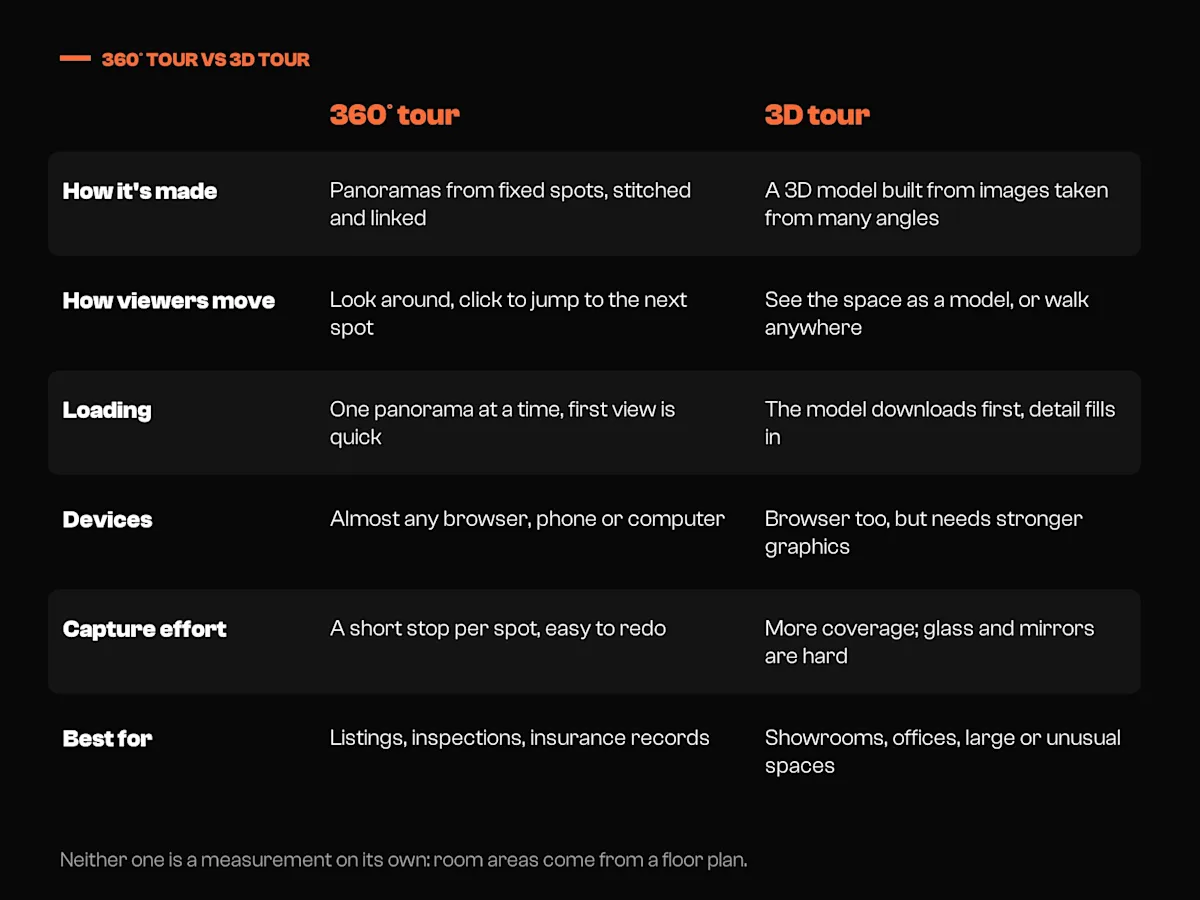
Capture is where the two formats split first. With 360° you take one panorama per spot, the app stitches it, and you link the spots. If one comes out wrong you reshoot only that spot, and you can check it on the screen before you leave the room. A 3D capture has to see every surface from several angles, because the model has to be filled in between the positions. Then the model gets processed, and only after that can anyone view it. A corner you missed shows up later as a gap or a blur, often when you're no longer on site. Glass, mirrors, shiny floors and very bright windows give every 3D method trouble, and it takes practice before results are consistent.
What the viewer gets is the other side of that cost. A 360° tour is very good at answering what a room looks like from a given spot. A 3D tour answers how the whole place fits together, how the rooms connect, how high the ceiling feels and what's behind the sofa.
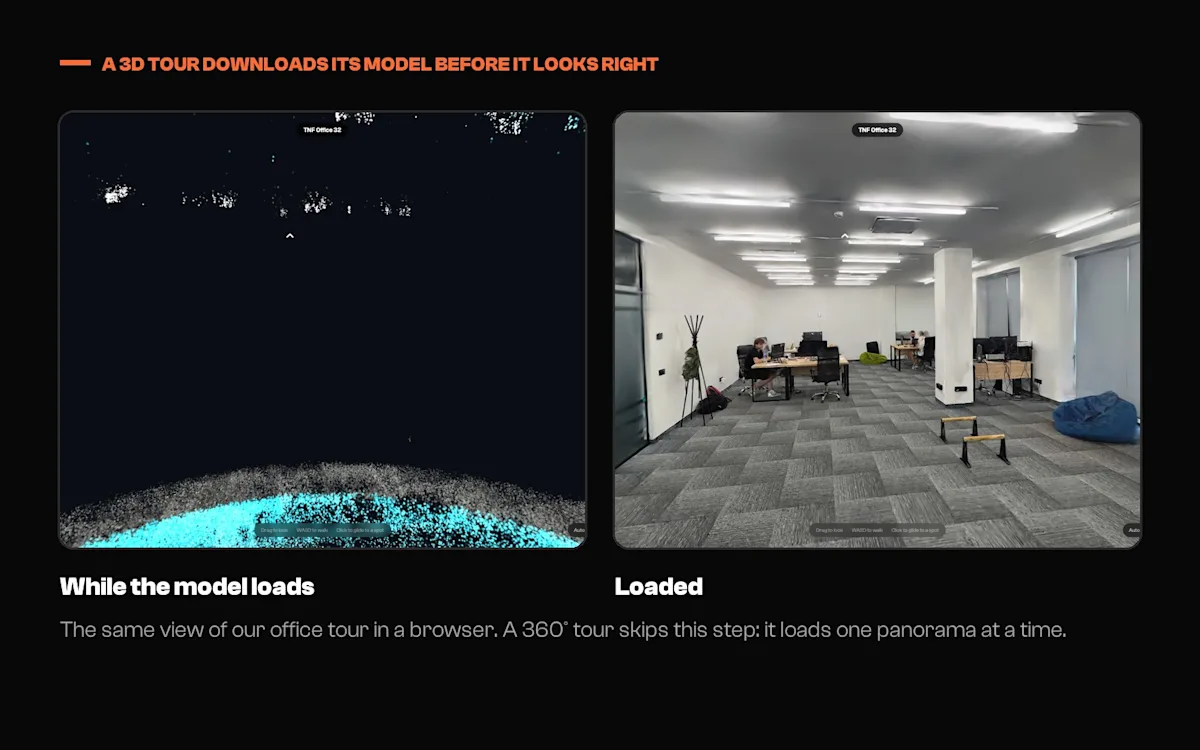
Loading is the trade-off I think about most as an engineer. A 360° viewer loads one panorama at a time, so the first view appears quickly and the next one loads when you click. A 3D viewer has to download the model before it looks right. On a fast connection that's a short wait. On a slow one the first seconds can look sparse or blurry while the detail fills in. Many 3D viewers, ours too, ship lower quality settings for slow connections and older devices for exactly this reason.
Devices follow from the same weight difference. A 360° tour opens in pretty much any browser. A 3D tour also runs in the browser with nothing to install, but it leans on the graphics hardware. Newer phones and laptops cope fine, and old or cheap ones may struggle.
Which one I'd pick for each job
For most home listings I'd go with a 360° tour and a floor plan. Buyers and renters see what each room looks like and how big it is, and the link opens on whatever phone they have. A 3D tour earns its weight for large or unusual layouts, for homes that sell on space and light, and for buyers deciding from far away. Check what your listing portal accepts first. Many take a tour link in a separate field.
For remote and virtual inspections, 360° is the better fit in my view. Each panorama is a fixed viewpoint you can return to, and it sits naturally next to a photo log and a floor plan. The reviewer can look at the ceiling, the floor and the corners from that spot. A 3D model helps someone understand a space, but inspection calls are usually about specific surfaces, so clear panoramas count for more. There's more on this in our guide to virtual inspections with an iPhone.
Insurance work looks similar. When you're recording the condition of a home or documenting a claim, panoramas on a floor plan give you a record you can go through room by room and compare later. A 3D model can help an adjuster who has never been on site understand a large or complicated property. The room areas still come from the floor plan.
Offices, showrooms, warehouses, shops and public buildings are where 3D really pays off. People there need to understand the whole space, plan changes or find their way around. Facility teams that keep a digital record of a building often end up wanting both, the model for the overview and fixed panoramas for the details.
Limits that apply to both
A 360° tour with too few panoramas makes a big room feel like a jump cut, and without a floor plan people lose track of where they are after a few clicks. Objects too close to the phone cause stitching errors, and so does turning your body instead of the phone. A 3D tour is heavier to load, harder on older devices, and blurry wherever the capture missed something.
Both formats show surfaces only. Neither will find a hidden problem, so neither replaces a site visit. And neither measures. Add a floor plan for room areas, and use a certified measurement when the job is a valuation or a legal document. Of all the extras you can put next to a tour, the floor plan is the one I'd never skip, because it tells people where they are and how big each room is.
What we ship at Noughty Reality
Noughty Reality is capture technology that runs inside property apps. One walk with an iPhone gives a measured floor plan with room areas and a 360° tour, with every panorama placed on the plan. Fully 3D tours are in beta. See how 3D tours work.